Tag: Intel

  • All 23 Intel Locations in 007 First Light: Completing & Solving Guide

    All 23 Intel Locations in 007 First Light: Completing & Solving Guide

    007 First Light is now available, so you should gear up with your silenced pistol, put on your laser watch, and get ready to take down enemies in exotic locations. This game follows the early years of James Bond, where you’ll face off against a mysterious enemy worldwide.

    During your journey, you’ll find many collectibles, including playing cards and references from previous Bond films. One of the key collectibles are the MI6 Intelligence Files, which reveal important details about the characters you meet. Below is a complete guide to help you find all 23 MI6 Files in the game.

    All MI6 Intel Locations

    When collecting MI6 Files in 007 First Light, note that they won’t be physically picked up when you interact with them. Instead, they will be marked as collected in your menu without disappearing from the environment. These files don’t have a distinct appearance, so they can look like a computer screen, a folder, or even an unusual object like a giant wooden spoon. It’s best to interact with everything you see to ensure you don’t miss any.

    Here is a detailed list of each MI6 File, which mission it belongs to, and a helpful image for locating it:

    Heart of the Matter — 00 Recruits
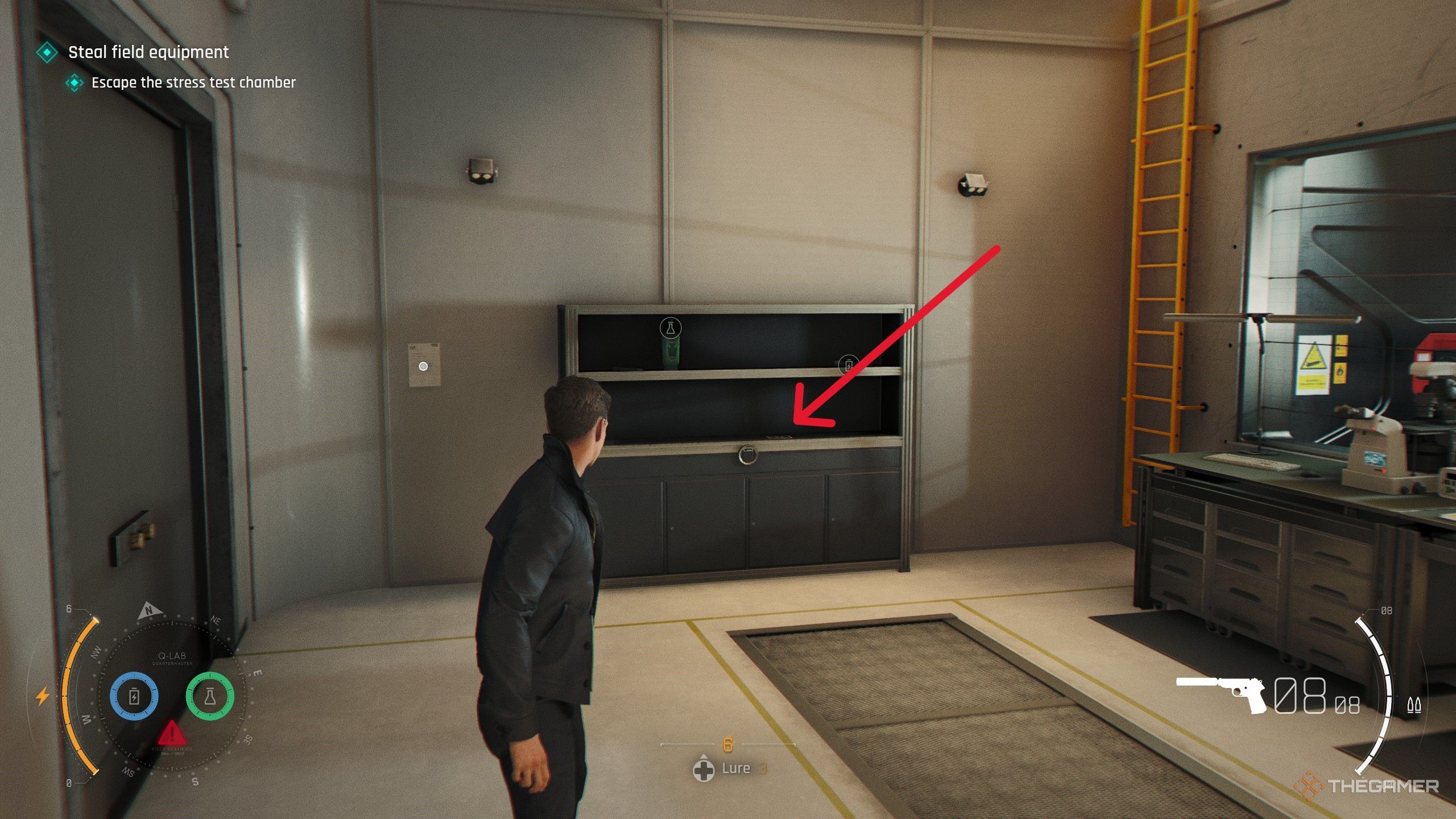
    First, play through the “Heart of the Matter” chapter until you can explore Q-Branch. After speaking with Q, go to the central podium and locate a computer terminal to the left of the SUV, on a desk behind the initial Q interaction. Interact with this computer to unlock the 00 Recruits file.

    Image:
    Location of MI6 file in Q-Branch
    Note: Interacting with the file logs it as obtained but doesn’t remove it physically.

    Heart of the Matter — Selina Tan
    While exploring the Q-Branch, head to the back right corner of the room. Behind the SUV in the box, find a small table mounted along the wall. Interact with the yellow paper there, which is Selina Tan’s file, and add it to your collection.

    Image:
    Location of Selina Tan’s file

    A New Home — Lennox Monroe
    In the “A New Home” chapter, after arriving at your penthouse in London, move through the space to the living room. On a dresser near the door, there’s a family photo of Lennox Monroe. Flip the photo to add it to your MI6 Files.

    Image:
    Location of Lennox Monroe’s file

    A New Home — Cressida Bright
    Inside the penthouse, go down the main hall and enter Cressida’s room through the second door on the right. She has a present box on her bed. Interact with the box to acquire her MI6 file.

    Image:
    Location of Cressida Bright’s file

    The Past Never Dies — Niko and Tero Murto
    During your third visit to Q-Branch and the Operations floor, after speaking to Q and receiving gadgets, go to the back of the floor. On a desk along the wall, there’s a file about the twins you fought at the hotel. Interact to collect it.

    Image:
    Location of Niko and Tero Murto’s file

    The Past Never Dies — John Greenway
    Once on 009’s boat in “The Past Never Dies,” enter the backroom. Inside, on a table, find a photo of John Greenway. Interact with it to add the file to your MI6 collection.

    Image:
    Layout in the boat

    Uninvited — James Bond
    Back at Bond’s penthouse, go to his bedroom and interact with the photo on the nightstand. This will unlock the James Bond MI6 File.

    Image:
    Location in Bond’s bedroom

    Uninvited — Webb Industries
    During the infiltration of the gala, after stealing the invite, enter the main room with a large bar. Go left into a room with empty chairs and a stage. Distract the guard at the entrance, then use the Bluff mechanic inside to stealthily grab the Webb Industries flyer from the table.

    Image:
    Interior of the gala

    Uninvited — Stephen Bright
    Inside the security room on the second floor, take the second door on the right into a conference room occupied by guards. Bond can convince them he belongs there, after which on the table in the center you’ll find Stephen Bright’s file.

    Image:
    Security room scene

    Going Old School — Q
    Near the start of “Going Old School,” visit Q-Branch. To the right of the car being repaired, interact with the driving gloves on a workbench. Picking them up will reveal the Q MI6 File.

    Image:
    Q-Branch workshop

    Time to Die — Theresa Lorca
    In the “Time to Die” mission, after meeting Lorca to plant a tracker, go to the Serenity Space. The MI6 File is on the ground in front of the loungers, near Lorca herself.

    Image:
    Scene with Lorca

    Time to Die — Caliban
    Post-mini-game where Bond helps put on his bowtie, go into the living room and interact with the file sitting on the desk to unlock this intel.

    Image:
    Living room scene

    Wave of the Future — M
    During the “Wave of the Future” mission, when upgrading your ID bracelet, enter the security room to find M’s profile sitting on a desk nearby.

    Image:
    Security room

    Wave of the Future — Sir Nicholas Webb
    After upgrading your bracelet, follow Isola to an area with a chair and a cat statue. Near the chair, find the profile of Sir Nicholas Webb on a nearby rock.

    Image:
    Nearby area

    Wave of the Future — Eve Moneypenny
    During the “For England” mission, after fighting outside Moneypenny’s office, enter the tunnels. In the maintenance area, her MI6 File is on the ground in the section with the pipes.

    Image:
    Maintenance tunnel

    Wave of the Future — Riptide
    Once reunited with Greenway after the sniper section, before moving on, find a black case on a bundle of cables. Interact with it to obtain the Riptide file.

    Image:
    Scene with cables

    Wave of the Future — Rhys Beckett
    After speaking with Q and entering the furnace room with the armored vehicle, look on the left wall for a locked cabinet. Use the four-digit code 4397, corresponding to the license plate number, then open it and interact with the photo inside.

    Image:
    Furnace room detail

    Wave of the Future — Sir Nicholas Webb (again)
    Right after upgrading your ID bracelet, follow Isola to a spot with a chair and statue. Nearby, find the profile of Sir Nicholas Webb sitting on a rock.

    Image:
    Location of Webb’s profile

    Wave of the Future — Eve Moneypenny (again)
    In the “For England” mission, after fighting outside her office, proceed into the maintenance tunnels. Her MI6 File is in a room with pipes, on the ground.

    Image:
    Scene with pipes

    Wave of the Future — Caliban
    Next, in the same mission, after upgrading your ID bracelet, go into the security room. Look on a desk near the vent for M’s profile.

    Image:
    Security room scene

    Wave of the Future — Time to Die — Eve Moneypenny
    During the final mission, once in her office, interact with her wallet located near some pipes to uncover her MI6 File.

    Image:
    Her wallet scene


    Always interact with anything that looks unusual or out of place in the environment to ensure you collect all MI6 files. These files provide a deeper look into the characters and story, enriching your gaming experience.

  • Why macOS Tahoe Matters for Intel Macs

    Why macOS Tahoe Matters for Intel Macs

    Promotional logo for WWDC 2023.
    Apple WWDC
    This article is part of our comprehensive coverage of Apple WWDC.
    Updated just now

    The Apple WWDC event commenced on Monday, featuring an array of new announcements and updates that outline the company’s software roadmap for the upcoming year.

    As is customary with each WWDC keynote, the transition to updated software brings with it reduced support for older Apple devices.

    A prime example is the forthcoming macOS 26, also known as macOS Tahoe, which will mark the final macOS release for Mac models equipped with Intel processors. Apple shifted to its custom-designed Apple Silicon chips, starting with the M1 in 2020 and completing this transition in 2023.

    Matthew Firlik, Apple’s senior director of developer relations, revealed this information during the Platforms State of the Union keynote at WWDC.

    Tahoe will be compatible with just four Intel-based Macs, released in 2019 and 2020, while the updated software will not function on Intel versions of the MacBook Air and Mac mini models.

    The following Intel Macs will support macOS Tahoe:

    • MacBook Air with Apple Silicon (2020 and later)
    • MacBook Pro with Apple Silicon (2020 and later)
    • MacBook Pro (16-inch, 2019)
    • MacBook Pro (13-inch, 2020; four Thunderbolt 3 ports)
    • iMac (2020 and later)
    • Mac mini (2020 and later)
    • Mac Studio (2022 and later)
    • Mac Pro (2019 and later)

    In contrast, several Macs that currently support macOS Sequoia (the existing version) will not be able to upgrade to macOS Tahoe, including:

    • MacBook Air (Retina, 13-inch, 2020)
    • MacBook Pro (13-inch, 2018; four Thunderbolt 3 ports)
    • MacBook Pro (15-inch, 2018)
    • MacBook Pro (13-inch, 2019; four Thunderbolt 3 ports)
    • MacBook Pro (15-inch, 2019)
    • MacBook Pro (13-inch, 2019; two Thunderbolt 3 ports)
    • MacBook Pro (13-inch, 2020; two Thunderbolt 3 ports)
    • iMac (Retina 5K, 27-inch, 2019)
    • iMac (Retina 4K, 21.5-inch, 2019)
    • iMac Pro (2017)
    • Mac mini (2018)

    Intel Mac users can still expect security updates for a time, but they will miss out on new features in macOS 27, scheduled for release next year, as it will only be available for Apple Silicon devices.

    Set to arrive for the latest Mac computers this fall, Tahoe features a substantial redesign with a new Liquid Glass transparent aesthetic, enhanced customization options for folders and app icons, a new Phone app for seamless iPhone call integration, significant updates to Spotlight, expanded Apple Intelligence features including Live Translation and smarter Shortcuts, and improved Continuity functions to enhance productivity and personalization between Mac and iPhone devices.


  • Intel Slashes Prices Of Top CPUs By $100

    Intel Slashes Prices Of Top CPUs By $100

    Intel has introduced significant price reductions on some of its top processors, marking what appears to be a permanent cut — although not all chips are seeing a drop. The company revealed that it is adjusting the pricing of several Arrow Lake processors, with a uniform discount of $100 along with a promotional game bundle.

    This announcement came via a blog post. The two processors affected are the Intel Core Ultra 7 265K, which has dropped from $399 to $299, and the Core Ultra 7 265KF, now priced at $284 instead of $384. Importantly, the pricing for Intel’s Arrow Lake desktop series remains unchanged outside these specific models.

    This new pricing strategy focuses solely on Intel’s upper midrange chips, while the flagship Core Ultra 9 285K and other mainstream models, such as the Core 5 245/245K/245KF, retain their original prices.

    While some users might find select Intel processors priced lower than the listed prices, those discounts are likely the result of retailer sales rather than adjustments made by Intel itself. Nevertheless, the new prices for the Core Ultra 7 processors should reflect similar reductions across various retailers. Intel has noted that actual pricing may differ based on region, retailer, taxes, and other factors.

    Additionally, Intel is running a promotional campaign offering two games, including Dying Light: The Beast, for customers purchasing an Intel Core Ultra desktop processor. For more information, visit Intel’s website.

    Upon its release, Intel’s Arrow Lake didn’t attract significant attention, even with the powerful Core Ultra 9 285K. Competing processors like AMD’s Ryzen 7 9800X3D have gained popularity among some gamers, which has impacted Intel’s market share. To stimulate sales, Intel is lowering the prices on select models from the Arrow Lake-S desktop lineup. It remains to be seen if other chips will experience similar price reductions.

  • Intel Nova Lake CPUs Could Need New Motherboards LGA 1954

    Intel Nova Lake CPUs Could Need New Motherboards LGA 1954

    Intel is set to launch its Nova Lake-S desktop processors, with a potential rollout in 2026. This launch might introduce a new LGA1954 socket, indicating yet another transition in the company’s consumer platform. Leaked shipping documents from NBD.ltd, shared by VideoCardz, reveal that Intel has started distributing preliminary test kits marked “NVL-S.” This suggests that motherboard manufacturers are already gearing up for this next-generation CPU series.

    The new LGA 1954 socket is expected to contain 1,954 active electrical pins, a significant upgrade from the current LGA 1851 socket used with Arrow Lake desktop chips. The total pin count could surpass 2,000 when including debugging or non-functional pins. This larger socket design may facilitate enhanced I/O features, improved power delivery, and more sophisticated chiplet architectures.

    Although Intel has yet to confirm any specifications, these developments suggest that users adopting Arrow Lake might need to invest in new motherboards with the arrival of Nova Lake. This could be disappointing for enthusiasts who hoped the LGA 1851 would have a longer lifecycle, as seen with the LGA 1700, which supported various generations of CPUs.

    Preliminary leaks and rumors concerning the Nova Lake CPUs imply some significant architectural changes. A report earlier this year indicated that the flagship models might feature as many as 52 cores, composed of 16 performance cores, 32 efficiency cores, and 4 low-power efficiency (LPE) cores. Even entry-level versions are anticipated to retain a substantial number of efficiency and LPE cores, with configurations that could feature just 4 performance cores.

    Further leaks hint at a dual-CCX (core complex) arrangement, reminiscent of AMD’s chiplet-based Ryzen CPUs, potentially accompanied by a substantial 144MB L3 cache tile that could enhance gaming performance similarly to AMD’s 3D V-Cache technology.

    Regarding core architecture, the performance cores are expected to utilize the Coyote Cove design, while the efficiency cores will likely adopt a new Arctic Wolf architecture, both succeeding the Cougar Cove and Darkmont cores from the Panther Lake generation.

    There are suggestions that Nova Lake might incorporate an off-die memory controller, which could introduce some latency. However, reports indicate that Intel has devised engineering strategies to mitigate any adverse effects on performance.

    While official specifications remain undisclosed, the introduction of the LGA 1954 socket along with a revamped CPU architecture signifies a substantial advancement in Intel’s desktop offerings. Additional details are expected to emerge as we move closer to 2026.

  • Microsoft Adds Copilot+ AI Tools for Intel and AMD PCs

    Microsoft Adds Copilot+ AI Tools for Intel and AMD PCs

    If you invested in a new AI-powered Copilot+ PC equipped with the latest Intel or AMD processor, and noticed the absence of certain features, your wait is finally over. Several of those Copilot+ enhancements are now becoming available for devices that utilize Intel and AMD processors.

    It’s been nearly a year since Microsoft unveiled the Copilot+ PC classification, designed to prioritize AI capabilities. Up until now, Qualcomm was the exclusive chip supplier for these devices.

    In late 2024, competing chip manufacturers entered the Copilot scene with the release of AMD’s Ryzen AI 300 series and Intel’s Core Ultra 200V series processors. However, many features remained inaccessible to those using Intel and AMD machines.

    That situation is finally changing today. Microsoft announces that Copilot tools such as Live Captions, Cocreator, Restyle Image, and Image Creator will now be available on Copilot+ hardware powered by Intel and AMD.

    What is changing?

    Starting with Live Caption, this functionality provides captions for videos, audio, and real-time interactions like meetings conducted in English. It can also translate text from over 40 different languages into English, as well as 27 languages into Chinese.

    In the future, a new feature called Voice Access will enable users to manage their PC using natural language commands. This feature is already rolling out to Copilot+ devices with Qualcomm chips, with support for AMD and Intel hardware anticipated soon.

    For creative tasks, the AI-powered Cocreator feature is now available in Paint across all device types. Microsoft claims it helps make artistic creation and image enhancement more intuitive and accessible. Users can blend text-based editing with freehand drawing, providing added flexibility.

    Through the Photos app, users of Intel and AMD machines will also gain access to the Restyle Image and Image Creator tools. The Image Creator function allows for generating images based on text descriptions, similar to how you would interact with ChatGPT to create Ghibli-inspired art. The Restyle tool, meanwhile, applies artistic effects to images in a preset manner.

    All of these AI features will be available on AMD and Intel-powered Copilot+ PCs with the March 2025 Windows update. It’s intriguing to consider why these capabilities were initially absent from Intel and AMD devices, even though they satisfied the minimum AI performance criteria.

    Unfortunately, this trend of missing features is not expected to end soon. Recently, Microsoft announced enhancements to the Windows Search experience, which will significantly simplify locating files, photos, and settings. Regrettably, this improvement will only be available for Snapdragon-based Copilot+ devices.

  • Intel CEO Assures New CPUs Are On Track Despite Past Struggles

    Intel CEO Assures New CPUs Are On Track Despite Past Struggles

    Intel has experienced a tough couple of years, particularly regarding the performance of its high-end processors. Challenges like the Raptor Lake instability and modest generational enhancements seen in the Core Ultra 9 285K and the Arrow Lake series suggest that the upcoming CPUs have significant hurdles to clear. Nonetheless, the new CEO of Intel, Lip-Bu Tan, has offered a positive outlook on the company’s product trajectory, highlighting the Panther Lake and Nova Lake CPUs.

    Tan took over as CEO this year following the exit of former CEO Pat Gelsinger. In a recent letter sent to shareholders, which was highlighted by Wccftech, Tan acknowledged the areas requiring improvement but expressed an optimistic view: “While there are clear challenges that we need to overcome, there are also significant opportunities to accelerate our turnaround and improve our performance.”

    In his correspondence, Tan outlined the future roadmap for consumer CPUs and affirmed that Intel is indeed on course to meet its prior commitments despite earlier reports to the contrary.

    “We will further enhance our position in the second half of this year with the launch of Panther Lake, our flagship product on Intel 18A, followed by Nova Lake in 2026,” wrote Tan in the letter to shareholders.

    To quickly summarize, Panther Lake will feature Intel’s next-generation mobile CPUs destined for laptops and other devices. These chips are expected to fall under the Core Ultra 300 series, featuring a design optimized for both efficiency and performance.

    Intel CEO Lip-Bu Tan.
    Intel

    On the other hand, Nova Lake will represent the upcoming range of desktop and laptop CPUs, reportedly aiming for substantial performance gains. Early rumors suggest the flagship model could feature as many as 52 cores, which would be a significant leap from the existing generation—though such information should be taken lightly until the official release.

    This announcement is encouraging, especially since earlier leaks indicated that Panther Lake would not be released until 2026. Now, it appears Intel aims to unveil these processors in 2025, although the extent of their availability remains uncertain. As these CPUs are tailored for laptops, it’s possible that we’ll see some product launches around CES 2026, typically the trend, although there may be devices ready at launch with others following shortly after.

  • Intel Aims To Make Modular Laptops Popular

    Intel Aims To Make Modular Laptops Popular

    Intel has unveiled a detailed proposal outlining its vision to develop modular laptops and mini PCs. This approach aims to reduce electronic waste and lower the carbon footprint while allowing users to easily repair and upgrade their devices.

    While desktop PCs have long been modular—where users buy components like cases and parts separately to assemble at home—laptops and mini PCs follow a fundamentally different design. Opening a laptop often reveals components tightly stacked together and soldered onto the motherboard, making them inaccessible for upgrades or repairs.

    Intel’s concept promotes breaking this integrated design into three distinct segments: a motherboard and two input/output (IO) modules. These IO modules would be adaptable for various system configurations, including fanless designs and single or dual-fan systems, catering to both consumer and business markets. By utilizing interchangeable parts across different models, Intel aims to enhance manufacturing efficiency.

    With this modular framework, older laptops could potentially accommodate new processors without requiring a complete redesign. Companies might initially worry that increased repairability and upgradability could hurt their profits, but the cost savings from reusability and simplified maintenance might ultimately benefit them. For consumers, this modularity translates into extended device longevity, as they could replace memory and processors to keep their laptops functioning at optimal levels.

    Similarly, mini PCs would shift away from an all-in-one configuration, breaking down into three parts: a graphics card module, a central processing unit (CPU) module, and a Platform Controller Hub (PCH) module. This would effectively function like a compact desktop, allowing users to swap components as needed.

    Currently, Framework is one of the few manufacturers providing modular laptops; however, its offerings often lack the quality that more general consumers expect, appealing mostly to those prioritizing repairability and upgradability.

    If Intel fully embraces the modular design concept, it could pave the way for mainstream adoption, prompting other manufacturers to follow suit. This transition could lead to more competitive pricing, inspire innovative designs, and ensure we have high-quality devices that meet diverse needs.

  • How To Install Intel The Microcode 0x129 Update Asus?

    How To Install Intel The Microcode 0x129 Update Asus?

    Installing an Intel microcode update, specifically version 0x129, on ASUS motherboards can enhance system stability and security. This guide will walk you through the step-by-step process for a successful installation, ensuring that you have a smooth experience.

    Understanding Intel Microcode Updates

    What is Microcode?

    Microcode serves as a lightweight layer between the hardware and software of your CPU. It allows manufacturers to fix bugs, improve performance, and enhance security features without needing to replace hardware.

    Why Update?

    Updating to the latest microcode is essential for several reasons:

    • Performance Improvements: The update can optimize CPU performance for various applications.
    • Security Fixes: Microcode updates often resolve vulnerabilities that may expose systems to security risks.
    • System Stability: Bug fixes in the microcode contribute to improved system stability.

    Preparing for the Update

    Before proceeding with the installation of the Intel microcode update, ensure that your system is ready.

    Check Compatibility

    • Verify that your ASUS motherboard model supports the Intel microcode update (refer to ASUS documentation).
    • Make sure your CPU is compatible with microcode version 0x129.

    Backup Your Data

    Always create a backup of your important data before performing system updates:

    • Use an external hard drive or cloud storage for backups.
    • Create a system restore point for additional safety.

    Downloading the Update

    To install the Intel microcode update 0x129, you need to download the correct files.

    Steps to Download

    1. Visit the ASUS Support Website:

      • Go to the ASUS support page and navigate to the support section for your motherboard.

    2. Select Drivers & Tools:

      • Find the ‘Drivers & Tools’ or ‘Downloads’ tab.

    3. Locate the Microcode Files:

      • Search for the Intel microcode update version 0x129 under BIOS or firmware updates.

    4. Download the Update:

      • Download the latest version and save it to a known location on your hard drive.

    Installing the Update

    Once you have the microcode files, you can begin the installation process.

    Preparing the BIOS/UEFI

    Before you can apply the update, you need to make sure your BIOS/UEFI is ready.

    How to Enter BIOS/UEFI:

    1. Restart your computer.
    2. As it boots, press the appropriate key (usually Delete, F2, or F10) to enter the BIOS/UEFI setup.

    Update Process

    1. Locate the BIOS Flash Utility:

      • In the BIOS/UEFI menu, find the ‘Tool’ tab or section that includes the BIOS Flash utility or ASUS EZ Flash.

    2. Select the Microcode File:

      • Choose the option to update the BIOS from a file.
      • Navigate to the location where you downloaded the microcode file.

    3. Begin Installation:

      • Confirm the update process and allow the system to apply the new microcode. This may take a few minutes.

    4. Reboot the System:

      • Once the update is complete, you’ll be prompted to restart your computer. Make sure to adhere to the instructions.

    Verifying the Update

    After the installation process, verifying that the update was successful is crucial.

    Steps to Verify

    1. Re-enter BIOS/UEFI:

      • Restart your computer and enter the BIOS/UEFI again.

    2. Check Microcode Version:

      • Locate the CPU information section and check that the microcode version reflects 0x129.

    3. Boot into Operating System:

      • Start your operating system and ensure it loads without any issues.

    Common Troubleshooting Tips

    If something goes wrong during the update, here are some tips to resolve potential issues:

    • Black Screen on Boot:

      • Reset the BIOS settings to default and try restarting.

    • Update Fails:

      • Make sure the microcode file is not corrupted. Redownload if necessary.

    • Performance Issues Post-Update:

      • Revisit the BIOS settings to verify they are correctly configured.

    By following these detailed steps, you should be well-equipped to successfully install the Intel microcode 0x129 update on your ASUS motherboard, leading to improved performance, stability, and security in your system.

  • AMD Calls Intel Arrow Lake ‘Terrible’

    AMD Calls Intel Arrow Lake ‘Terrible’

    AMD’s Chief Takes a Swipe at Intel’s Arrow Lake CPUs Amid Processor Shortages

    Shots fired in the tech arena! Frank Azor, a top executive at AMD, recently criticized Intel’s Arrow Lake series of processors by labeling them as "horrible." This bold statement is tied to an ongoing shortage of AMD’s high-demand gaming CPUs. Astonishingly, AMD has pointed a finger at Intel, claiming its competitor’s lackluster performance is contributing to the current scarcity of AMD’s X3D processors.

    During a recent media roundtable reported by Tom’s Hardware, AMD candidly acknowledged it underestimated the demand for its CPUs. The company initially anticipated lower interest, assuming Intel would put forth a more competitive push. However, with Arrow Lake failing to impress, consumers have increasingly favored AMD’s offerings for their next-gen processors.

    Azor commented to Tom’s Hardware, "We were confident in the quality of our products. What we didn’t expect was that the competitor’s offerings would be so subpar, leading to demand exceeding our forecasts."

    The Ryzen 7 9800X3D, a highlight of AMD’s Zen 5 lineup featuring cutting-edge 3D V-Cache technology, has been grappling with significant supply challenges since its release. AMD representatives noted during the discussion that they are actively working to alleviate these shortages, but creating a new 3D V-Cache chip is a lengthy endeavor.

    David McAfee, AMD’s corporate VP and head of Client Channel Business, revealed to PC World that the company is ramping up production capabilities. "We’re increasing our output of X3D processors, significantly surpassing our initial plans. The demand for both the 9800X3D and 7800X3D has been unprecedented," he stated.

    The limited supply of the Ryzen 7 9800X3D has frustrated consumers, resulting in inflated prices and scarce availability at retailers. In response, AMD assured its customer base that it is diligently collaborating with TSMC to boost production and address shortages effectively.

    Recent data shared by X user @TechEpiphanyYT highlights AMD’s success, indicating that during the first week of 2025, the company sold 8,830 processors compared to Intel’s mere 435—a striking indicator of AMD’s dominance in the market. This preference is evident, especially as AMD fulfilled 5,000 back-ordered Ryzen 7 9800X3D units in just one week, while Intel’s latest Arrow Lake CPUs managed to sell only 20 units, showcasing a clear tilt toward Team Red in the current competitive landscape.

    As Intel faces mounting scrutiny regarding its production delays and overall performance, the pressure on TSMC’s manufacturing capabilities remains a critical issue that could have broader implications for the tech industry. While Intel has not addressed AMD’s recent claims directly, industry analysts note that the current dynamics between these two giants can potentially reshape market trends.

  • Intel’s New CPUs Surprise Us All

    Intel’s New CPUs Surprise Us All

    As CES 2025 approaches, excitement is building for forthcoming announcements, with several companies already hinting at new products. Intel has revealed that it will expand its line of CPUs, potentially challenging some leading processors in the market. The company has kicked off preorders for its new Arrow Lake CPUs, although they are not yet accessible to many consumers.

    According to VideoCardz, Intel China has initiated preorders for the Core Ultra 200 non-K CPUs, with an official launch date slated for January 13. These CPUs are expected to be non-overclockable variants of existing Arrow Lake models, like the Core Ultra 9 285K. In its announcement, Intel hinted at “new architecture” and improved “power efficiency.”

    This intriguing announcement was somewhat unexpected. Currently, it appears that the preorders are limited to the Chinese market, as Intel’s global channels have not acknowledged the development. A key question remains: will these Core Ultra 200 non-K processors become available internationally on January 13, or will their launch initially be confined to China? We might have to wait for Intel to provide more information, likely during CES 2025.

    Intel China announces Core Ultra 200 non-K.
    Intel Chip Products

    In another notable development reported by VideoCardz, there seems to be a planned launch of Arrow Lake-H series CPUs in China and South Korea ahead of other regions. However, this information comes from a leak and should be taken with a grain of caution.

    According to a Weibo source, the Arrow Lake-H series, a collection of laptop CPUs built on Lion Cove and Skymont architectures, is expected to debut first in China and South Korea before rolling out to additional regions about a month later. These mainstream chips are likely to be paired with Nvidia’s next-generation RTX 50-series graphics cards, which would interest many consumers. However, what gamers might be most eager to hear about—the Arrow Lake HX-series—was not mentioned in this update.

    Overall, these developments point to the potential rollout of Intel CPUs in China before they’re introduced to the global market. More insights are anticipated during CES 2025.

  • Windows 11 Recall Now Affects Intel And AMD

    Windows 11 Recall Now Affects Intel And AMD

    Microsoft's Recall feature.
    Microsoft

    Microsoft is rolling out support for the Recall AI feature to Copilot+ PCs equipped with Intel and AMD processors, following the resolution of several prior issues.

    Initially, Recall was launched exclusively for Copilot+ PCs powered by Qualcomm processors in a Windows 11 update at the end of November, granting Windows Insiders in the Dev Channel the ability to use this AI tool to capture “snapshots” of their devices for future reference.

    After addressing a number of glitches, including malfunctioning snapshots, the Recall feature is now deemed stable enough to extend its compatibility to more Copilot+ PCs. Users on Intel and AMD systems will receive the latest Recall update—version 26120.2510 (KB5048780)—on Friday. This update remains exclusive to Windows Insiders in the Dev Channel.

    Despite earlier concerns over privacy with this feature, Microsoft remains committed to ensuring its safe functionality. Although the necessary models will be installed with the update, users must manually activate the snapshots function for Recall to operate. Furthermore, users can manage the duration of how long snapshots are saved or deleted, and sensitive information like credit card numbers, passwords, or personal identification details will not be recorded in these snapshots.

    The update also enhances security measures for the feature. Users will now need to employ Windows Hello facial recognition for identity verification before accessing their snapshots. In addition, utilizing BitLocker and Secure Boot is essential for the feature to function properly.

    Microsoft is also promoting the “Click to do” capability within Recall, which allows users to interact with elements within a snapshot by simply clicking on them, enabling actions like copying text or saving images using the Windows key combined with a mouse click.

    Since its initial announcement earlier this year, Recall has faced numerous challenges. It was originally scheduled for a preview release in June but was postponed several times due to various controversies and issues.


  • Intel’s New $249 GPU Makes 1440p Gaming Accessible

    Intel’s New $249 GPU Makes 1440p Gaming Accessible

    In 2024, Intel is set to challenge traditional notions of budget graphics cards with the introduction of the Arc B580 GPU. Officially labeled as Intel’s “worst kept secret,” the B580 marks the inaugural product in Intel’s Battlemage line of discrete GPUs, priced attractively at $249. While this price range has historically been associated with 1080p performance, Intel asserts that the B580 aims to shift that perception.

    According to Intel, this card is designed for 1440p gaming. Even though it is pitched against pricier GPUs such as the RTX 4060 and RX 7600—both targeting 1080p resolution—Intel claims that the B580 outperforms these competitors while maintaining a lower price. As Intel’s Tom Petersen noted during a pre-briefing, “1440p is becoming the new 1080p.”

    Performance for the Intel Arc B580 compared to the Nvidia RTX 4060.
    Intel

    In terms of raw performance, Intel claims the B580 is about 10% quicker than the RTX 4060 on average, although specifics on the RX 7600 were not provided. While this margin may seem modest, certain titles highlight substantial advantages for this new GPU. For instance, in Cyberpunk 2077, the B580 exhibits a 43% performance increase, while in Resident Evil 4, it enjoys a 32% speed advantage.

    It’s no shock that the B580 excels in memory-intensive games compared to the RTX 4060, which has 8GB of VRAM. The B580 offers 12GB of VRAM, enhancing its performance at the higher resolution of 1440p with maximum settings, especially in titles like Resident Evil 4. In games less dependent on VRAM, the performance gap narrows.

    Intel's Arc B580 compared to the A750 GPU.
    Intel

    When it comes to comparing generations, Intel claims the B580 outpaces the previous A750 by an average of 24%. Again, since the A750 is limited to 8GB of VRAM, the gains are particularly evident in games such as The Last of Us Part One.

    Receive a weekly analysis of the technology behind PC gaming


    Check your inbox!

    Throughout its unveiling, Intel drew various comparisons to the A750, particularly noting performance per watt and performance per dollar. This focus is particularly intriguing given that Intel also offers the Arc A580—details of which can be found in our review of that model. The naming surely reflects Intel’s ambitious plans for the Battlemage series, which has long been rumored in the industry.

    As of now, Intel has unveiled just two GPUs: the B580, which launches on December 13 at $249, and a Limited Edition model alongside various designs from partners like ASRock, Acer, and Sparkle.

    Specs for the Intel Arc B580 and B570.
    Intel

    The B570, a streamlined version of the B580, is set to launch on January 16 at $219. Although Intel has not disclosed performance data for the B570 yet, it is anticipated to perform closely behind the B580 in gaming scenarios based on its specifications.

    At this point, we’re relying on Intel’s performance data. As always, it will be essential to test the B580 upon release to verify Intel’s performance claims and assess how it competes against other 1440p-focused GPUs, including the RTX 4060 Ti and RX 7700 XT.

    The back shroud of the Intel Arc B580 GPU.
    Intel

    Regardless, the $249 price tag is compelling. At present, neither Nvidia nor AMD offers products at this low price point for this generation. The cheapest options available are the RTX 4060 at $299 from Nvidia and the RX 7600 at $269 from AMD. Intel appears committed to keeping the B580 at this strategic price. Additionally, the Limited Edition cards will be manufactured in Vietnam, potentially circumventing the proposed tariffs on imports from China and Mexico slated to take effect next year.

  • Intel Accepts Loss on Arrow Lake — Still in the Game

    Intel Accepts Loss on Arrow Lake — Still in the Game

    Intel’s Arrow Lake CPUs have not had the smoothest launch. Our reviews of the Core Ultra 9 285K and Core Ultra 5 245K highlight how these new processors failed to impress in both productivity and gaming tasks, falling significantly short of the top processors available today. Intel acknowledges several issues with the platform and has plans to rectify them soon.

    In an interview with HotHardware, Intel’s Robert Hallock candidly stated, “The launch didn’t go as planned… we have a number of things we need to fix.” Hallock, who previously worked at AMD, is a leading figure in Intel’s technical marketing. While he did not specify the exact problems affecting Arrow Lake, he did assure that Intel is actively working on updates that could lead to substantial performance improvements within a few weeks.

    “There are BIOS, firmware, and OS-level issues that we need to resolve,” Hallock mentioned. “We will return with a comprehensive review and a detailed list of what went wrong.”

    It is not surprising that there are significant issues with Arrow Lake. Our tests showed that while the new CPUs achieved some remarkable benchmarks—such as the Core Ultra 9 285K outpacing the 32-thread Ryzen 9 9950X in rendering applications like Cinebench with its 24 threads—they struggled in gaming performance, particularly when compared to the Ryzen 7 9800X3D.

    The performance inconsistencies are noticeable. Intel has made considerable advancements in certain applications, yet they lag significantly in others. Hallock has clarified that these issues are not a result of user error or review biases, describing the problems with Arrow Lake as “self-inflicted.” Although he did not commit to a specific timeline for the performance fixes, he indicated that updates should be expected by the year’s end.

    There is hope that these updates will address the performance gaps observed by numerous reviewers, including those from Digital Trends, during the launch phase. Intel has been facing challenging times, with speculation about a potential AMD buyout circulating. Arrow Lake, featuring a drastically new architecture, was anticipated as a pivotal moment for the company. Unfortunately, it has so far struggled to compete with AMD’s offerings and even its predecessor Intel processors. The forthcoming updates could prove crucial for Intel’s redemption.

  • Intel’s Upcoming Laptop Chips May Feature A Secret Advantage

    Intel’s Upcoming Laptop Chips May Feature A Secret Advantage

    A new graphics solution from Intel, known as the Intel Arc 140T, has surfaced on GFXBench, and it’s generating buzz due to its impressive performance metrics. Notably, it shows a significant performance edge compared to the Xe2-based Arc 140V integrated GPU, which was recently integrated into Intel’s new Lunar Lake mobile CPUs.

    Michael (@miktdt) highlights the GFXBench results for the Arc 140T in comparison to two variants of the Arc 140V— one with 16GB of memory and the other with 8GB. The Arc 140V with 8GB managed to achieve 6,613 frames at an average of 106.7 frames per second (fps), while the 16GB model scored 6,839 frames at 110.3 fps. In stark contrast, the 16GB Intel Arc 140T achieved a remarkable 11,056 frames with an average of 178.3 fps, surpassing the 16GB Arc 140V by a staggering 62%, even though both GPUs house eight Xe cores.

    While Intel has yet to make an official announcement regarding the specifics of the Arc 140T, its naming convention and core configuration hint that it is likely another integrated graphics solution, as opposed to a discrete GPU like the Arc A770 or A750. It is expected that the 140T will serve as the integrated GPU for Intel’s forthcoming Arrow Lake-H/HX mobile platform, which is designed for enhanced performance, unlike Lunar Lake, which prioritizes power efficiency.

    Leaked GFXbench benchmark scores of Intel Arc 140T.
    Michael (@miktdt) on X

    The Intel Arc 140T’s superior performance is likely attributed to its use of high-power transistors. In contrast to the Lunar Lake Xe2 integrated GPU, which utilizes low-power transistors, Arrow Lake’s architecture employs standard or high-power transistors. This design choice enables the Arc 140T to achieve higher clock speeds, resulting in substantial performance gains over the Arc 140V.

    While Intel is anticipated to unveil its Arrow Lake-H/HX chips in early 2024, the emergence of the Arc 140T hints at significant enhancements in Intel’s mobile graphics capabilities. Should these early benchmarks hold true, the Arc 140T could redefine the performance standards for integrated GPUs, potentially rivaling entry-level dedicated graphics solutions. However, keep in mind that these conclusions are based on preliminary data, and it is advisable to await Intel’s official announcement for confirmation.

  • Intel’s New Arrow Lake CPUs Use A Lot Of Power

    Intel’s New Arrow Lake CPUs Use A Lot Of Power

    Intel has generated significant buzz around the efficiency of its forthcoming Arrow Lake CPUs, which aim to rank among the top processors upon their release later this week. However, early benchmark results shared by HXL on social media indicate that these CPUs can consume a substantial amount of power if users deviate from Intel’s default power settings.

    The benchmark results reveal that the Core Ultra 9 285K reached a peak power draw of 370 watts during the Cinebench R23 multi-core test. While the CPU is obscured in the post, the 24 cores identified by Cinebench make it clear that it is the Core Ultra 9 285K. Intel cites a maximum turbo power of 250W and a base power of 125W for this CPU.

    5.6+4.9

    Source: QQ pic.twitter.com/YuY1l0z92K

    — HXL (@9550pro) October 21, 2024

    Interestingly, there’s more to the performance picture beyond the maximum power draw. The Core Ultra 9 285K achieved a score of 46,289 points in the benchmark—one of the highest scores recorded. For comparison, AMD’s Ryzen 9 9950X scored 42,707 points in our tests. Notably, the Core Ultra 9 285K accomplishes this superior performance using 24 threads, whereas the Ryzen 9 9950X utilizes 32 threads.

    As reported by VideoCardz, this peak performance shouldn’t be expected in standard configurations. The site claims that the result showcases the Core Ultra 9 285K operating without power limits, which can usually be adjusted in the BIOS. Under default power settings, the score is predicted to be just above 42,000 points, based on several leaked benchmarks.

    Intel has clarified that, for the Core Ultra 9 285K, the power levels PL1 and PL2 are equivalent. PL1 represents the maximum turbo power, while PL2 denotes the peak turbo power achievable for a short duration. Therefore, for this CPU, users can anticipate a constant 250W draw under maximum boost when adhering to Intel’s default settings. Past experiences with CPUs like the Core i9-14900K suggest that motherboard manufacturers may offer options to bypass these power limits for enhanced performance.

    Given that HXL’s benchmark likely involved removed power restrictions, this bodes well for high-performance PC enthusiasts with sufficient cooling solutions. Nonetheless, it’s probable that most systems won’t replicate this extraordinary level of performance.

    Intel is still trying to recover from previous complications with the stability of the Core i9-13900K and Core i9-14900K, which stemmed partly from unregulated power limits in the BIOS. In light of these ongoing challenges, Intel may have encouraged motherboard manufacturers to adhere to default power restrictions for Arrow Lake CPUs, at least in retail configurations.

    Get your weekly breakdown of the tech driving PC gaming


    Check your inbox!

  • A New And Improved Surface Laptop Could Be On The Way

    A New And Improved Surface Laptop Could Be On The Way

    A recent leak suggests that Microsoft might be developing an Intel variant of the Surface Laptop 7th Edition. A listing for the upcoming device was seen on Reddit, indicating it could feature a Core Ultra 7 268V processor. Although this listing has since been taken down, it reportedly stated that the laptop wouldn’t launch until 2025.

    Further support for a Lunar Lake version of the Surface Laptop has been confirmed by sources from Windows Central.

    It’s important to highlight that Microsoft made headlines when it introduced its flagship laptop exclusively on Qualcomm’s Snapdragon X platform. Their robust backing of Qualcomm and the Windows on Arm initiative represented a significant shift for the PC industry, especially in light of the advancements seen with Apple Silicon.

    Considering the impressive capabilities of Intel’s newly launched Lunar Lake (also known as Core Ultra Series 2), it isn’t surprising that Microsoft would seek to incorporate these cutting-edge chips. To effectively compete with Qualcomm, Intel needed to showcase a compelling response, particularly regarding battery life, which they have managed to achieve.

    The possibility of a Lunar Lake version of the Surface Laptop 7th Edition is quite captivating. The Qualcomm model has quickly become my favorite laptop of 2024 and has ranked highly among the best laptops available. Since its release this summer, it has been my primary device, thanks to its sleek design and the exceptional efficiency of its Snapdragon X Elite chip.

    However, a challenge has arisen. With the launch of Intel’s Lunar Lake chips, which offer superior battery life compared to the Snapdragon X Elite, this new version could enhance the overall user experience. Achieving such a significant improvement in a single generation is impressive, and the upcoming Surface Laptop would benefit greatly from this enhanced battery performance. Additionally, Intel’s new chips boast significantly better integrated graphics compared to their Snapdragon counterpart.


    When comparing overall performance between the two chips, the results will vary based on individual use cases. Nonetheless, one could argue that Intel’s solution might be more suitable for this particular device.

    Ultimately, the deciding factor will be the price. The Qualcomm version of the Surface Laptop 7th Edition debuted at $999, equipped with 16GB of RAM and 256GB of storage, reflecting a slight price reduction compared to earlier models. How the Intel variant is priced within this context remains to be seen, especially if it ends up being more expensive.


  • Intel’s New Arrow Lake CPUs May Face Cooling Issues

    Intel’s New Arrow Lake CPUs May Face Cooling Issues

    Intel is reportedly poised to launch its 15th-generation Arrow Lake processors in just a few weeks. This new series is anticipated to position itself among the top contenders in the CPU market, employing the newly designed LGA 1851 socket. However, this new packaging might present challenges in managing thermal performance effectively.

    Well-known overclocker and YouTuber der8auer has pointed out that the hottest point of the Arrow Lake CPUs is located “much further north,” indicating that the peak thermal area is found near the top of the chip. While varying hot spot locations are not uncommon—AMD’s Ryzen 9 9950X, for example, has its hot spot toward the bottom of the package—this change means that cooling solutions will need to adapt to optimize performance.

    Compatibility also becomes a topic of discussion here. Although reports suggest the LGA 1851 socket matches the dimensions of the LGA 1700 socket, implying that most existing CPU coolers should remain compatible with the new socket, some upgrades to mounting hardware may be necessary. Previous Intel CPUs featured a monolithic design, centering the hot spot near the chip’s center. In contrast, Arrow Lake employs a structure that combines different dies, similar to AMD’s newer Ryzen CPUs, leading to a repositioning of the compute tile—now located closer to the top of the package.

    The question now is whether this shift will significantly impact cooling performance for current coolers. The integrated heat spreader (IHS), CPU mount block, and thermal paste all collaborate to ensure optimal heat dissipation between the CPU and cooler. However, der8auer notes that “to achieve optimal cooling, the center of cooling should be adjusted to target the hot spot. Rotating the cooler’s block 180 degrees could negatively affect thermal performance.”

    For overclockers aiming to extract maximum performance from their setups, the relocation of the hot spot will matter. Der8auer suggests that a custom water block with the inlet positioned at the north end of the chip and the outlet at the south would offer the best cooling solution. Meanwhile, typical users may not notice a substantial difference in performance, as this largely depends on the heat output of the CPU itself.

    Intel’s latest high-performance CPUs, like the Core i9-14900K and Core i9-13900K, are known to demand considerable cooling capabilities. Even with a high-quality all-in-one (AIO) liquid cooler, the latest flagship scores temperatures reaching 90 degrees Celsius or more under heavy workloads. Should the Arrow Lake series have similar thermal requirements, then the positioning of your CPU cooler could indeed play a crucial role in performance—especially when every degree counts between optimal performance and thermal throttling.

    We can expect to learn more about the Arrow Lake CPUs soon, as rumors suggest that Intel may unveil the new lineup on October 10, followed by a release later that month.